Reshaper AI: What It Is, How It Works, and Who It's For
Reshaper AI is a tool that takes one piece of content you already made, a video, an article, a LinkedIn post, a podcast transcript, and rewrites it into platform-ready writing for wherever else you post: LinkedIn, Instagram, and Substack. It doesn't generate ideas from nothing, it works from something you give it, and it writes in your own voice instead of a generic AI tone.
What it actually does, start to finish
- You bring a source: paste a YouTube link, an article URL, a LinkedIn post, or a transcript
- You pick which platforms you want it repurposed for
- It reads the source and writes a distinct draft for each platform, in your saved voice
- You review each draft, edit anything you want to change
- You save it, copy it, or post it wherever you actually publish
That's the whole loop. There's no scheduling built in, no auto-publishing, every draft goes through you before it goes anywhere.
The part that makes the writing actually sound like you
Instead of describing your tone in a prompt every time, you submit a handful of things you've actually written, a post, a caption, a paragraph, and hit "Analyze my voice." Reshaper AI reads those samples back and hands you a written breakdown, your tone and rhythm, your specific habits, example excerpts, that you review and save as a profile. Every draft after that starts from that saved profile instead of a fresh description typed into a box.
Managing more than one voice
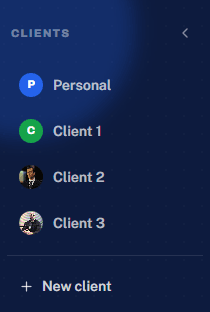
If you write for more than one client or brand, client workspaces keep each one completely separate, its own analyzed voice, its own content history. Switching between clients means picking a name from a list, not rebuilding context or worrying about one client's tone leaking into another's draft.
What it can and can't produce
- LinkedIn posts and Instagram captions, written specifically for how people read that platform
- Designed Instagram carousels, with slide-by-slide text, not just a caption
- Substack notes and full articles
- YouTube optimization: titles, descriptions, tags, and thumbnail help
- It won't brainstorm a post from nothing, it needs a real source to start from, and it doesn't edit video or generate images
Who it's actually for
Solo creators who post to more than one platform and are tired of rewriting the same idea three different ways by hand. Consultants and coaches turning client calls or long-form content into regular posts. Social media managers and agencies running content for several clients at once, where keeping each client's voice separate is the whole job. It's not built for people who want an AI to invent post ideas with no source material, or for pure video editing and clipping.
What it costs
There's a free-forever plan, 10 credits resetting every month at no cost, enough to try it on real posts. Paid plans start at $49 a month (Creator, 300 credits, 2 client workspaces) and go up to $149 a month (Pro, 1,000 credits, unlimited client workspaces). Reduced pricing is available for Pakistan, Bangladesh, and India based on regional purchasing power. The full breakdown of what a credit actually buys is in the pricing article.
How it's different from a general AI assistant
ChatGPT and Claude can write a good post if you describe exactly what you want, every time, in every new conversation. Reshaper AI keeps the voice and platform formatting already set up, so the setup work happens once instead of every session. Neither approach is universally better, if you want a single well-crafted piece of writing with no source material, a general assistant is more flexible. If you're turning existing content into platform posts regularly, that's the specific job Reshaper AI is built around. Full breakdowns in Reshaper AI vs ChatGPT and Reshaper AI vs Claude.
FAQ
Does it post directly to social media for me?
No. Every draft lands for you to review first, you copy, save, or post it wherever you actually publish, through whatever platform or scheduler you already use. Nothing goes out without you seeing it.
Do I need to know how to write good prompts?
No prompt engineering is involved. You paste in a source and pick platforms, the prompting work happens behind the scenes using your saved voice profile, not something you construct yourself each time.
What if I don't have a video, just an idea in my head?
Reshaper AI needs a real source to work from, it won't brainstorm a post from nothing. If all you have is a rough idea, write a few sentences about it yourself first, that short paragraph is enough of a source to repurpose from.
Getting started
Sign up, paste in something you've already made, a video link is the simplest first test, pick a platform, and read what comes back. No card required for the free plan, and nothing you generate posts anywhere until you copy or save it yourself.
Turn one piece of content into posts for every platform in seconds.