How to Repurpose a YouTube Video Into Social Media Content
You just spent an hour recording, editing, and publishing a YouTube video. Then it sits there. Meanwhile your LinkedIn is quiet, your Instagram hasn't posted in a week, and your newsletter is overdue. The video already has everything you need for all three. You just have to pull it out.
Here is a repeatable process for turning one YouTube video into a week of content across every platform you use, without re-recording anything.
Step 1: Get the transcript
Everything starts with text. A transcript turns your video into raw material you can search, quote, and rewrite. You have a few options:
- YouTube's own auto-generated captions (Settings → Show transcript on any video you own)
- A transcription tool if you want cleaner punctuation and paragraph breaks
- Pasting the video link straight into a tool like Reshaper AI, which pulls the transcript for you automatically
Whichever way you get it, save the transcript somewhere you can copy from. That one file is the source for everything below.
Step 2: Find the moments, not just the summary
Do not just summarize the video. Summaries make flat, boring posts. Instead, read back through the transcript looking for:
- A strong opinion or claim you made
- A specific number, result, or before/after
- A mistake you admitted to, or something you changed your mind about
- A moment where you explained something step by step
- A question you answered that people ask you often
A 15-minute video usually has 4 to 6 of these moments. Each one is a separate piece of content on its own, not a shortened version of the whole video.
A real example: video in, LinkedIn post out
Here is what this actually looks like, using a real video and a real result instead of a hypothetical one. A creator using Reshaper AI took this YouTube video, "I stopped watching Instagram reels (and here's what I felt)," and pasted the link straight in, no transcript pulled by hand, no manual retyping.
The video is a personal reflection on quitting Reels and what changed day to day. The LinkedIn post that came out of it opens with the sharpest idea buried in the middle of the video, not the intro, and builds outward from there:
"Make distractions boring enough that going back to work feels easier."
From there it walks through the actual before-and-after: reaching for Instagram out of boredom, then reaching for it after quitting Reels and finding nothing left to scroll, so the two-minute break ends on its own and the work resumes. Here is the real output, start to finish:
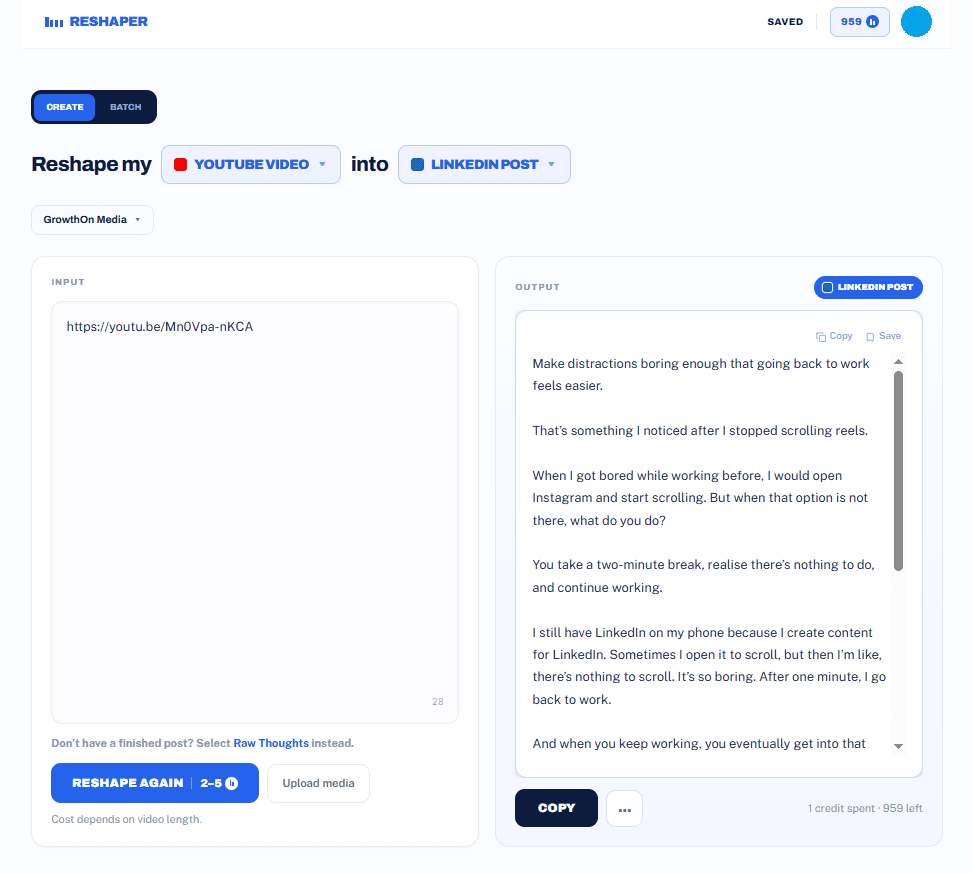
No editing, no rewriting the transcript by hand, no starting from a blank caption. One link in, one platform-ready post out, in the creator's own voice.
Common mistakes
- Repurposing the intro and outro.The first and last 30 seconds of most videos are throat-clearing ("hey guys, welcome back") or a call to subscribe. There is almost never anything worth reusing there. Look in the middle.
- Posting everything the same week. Four posts from one video spread across two weeks read as a consistent creator. Four posts in two days read as someone who just discovered a repurposing tool.
- Keeping the video's structure.A video can meander and still hold attention because of tone of voice and pacing. A post can't. If you keep the video's order of ideas instead of leading with the strongest one, the post reads slow.
- Treating every video the same. A tutorial video repurposes well into a carousel. A story-driven video repurposes well into a LinkedIn post. Trying to force a 14-minute tutorial into a single punchy LinkedIn post usually strips out the part that made it useful.
Step 3: Match each moment to the right platform
Different moments work better in different formats. As a rough guide:
Take your strongest opinion or the biggest lesson from the video and write it as a standalone post. Open with the claim, back it up with what happened in the video, and end with what you'd tell someone starting out. Leave the video link out of the post itself, or drop it in the first comment. Native text posts get seen more than posts with outbound links.
Turn a step-by-step section into a carousel: one idea per slide, first slide is the hook, last slide is the takeaway. If the video already has a punchy clip, that also works as a Reel with the key line as on-screen text.
Newsletter or Substack
This is the one place you can go long. Take the full argument from the video, reorganize it so it reads well instead of sounds well, and add anything you cut for time.
Short-form clips (Reels, Shorts, TikTok)
Pull the single most quotable 30 to 60 seconds. If nothing in the video is quotable on its own, that is worth noticing for your next recording.
Step 4: Rewrite, don't retype
Spoken language and written language are not the same. If you copy your transcript straight into a caption, it reads like a transcript, rambly, full of filler words, missing the punctuation that makes writing easy to skim. Take the ideas from the transcript and write them the way you'd write a post from scratch. Keep your phrasing and opinions, drop the "um," "so basically," and "like I said."
Step 5: Space it out
Don't publish everything on the same day. One video can realistically fund:
- 1 to 2 LinkedIn posts
- 1 Instagram carousel
- 1 to 3 short clips
- 1 newsletter issue
That is close to two weeks of content from a single recording session.
Frequently asked questions
Will repurposed content hurt my SEO or get flagged as duplicate content?
No, as long as you're actually rewriting it. Search engines flag duplicate content when the exact same text appears on multiple pages you control. A LinkedIn post, an Instagram caption, and a newsletter that share an idea but are written in different words for different formats are not duplicates, they're different pieces of content that happen to share a source.
How long after posting a video should I start repurposing it?
Right away, while the transcript and the moments are still fresh in your head. You don't need to wait for the video to get views first. If anything, a LinkedIn post that goes out the same week as the video can send people back to watch it.
Do I need to credit or link back to the original video?
Not on every post. Linking out on a platform that penalizes outbound links, like LinkedIn or Instagram, usually hurts reach more than it helps. Save the direct link for your newsletter or your bio, where clicking through is the point.
What if my video doesn't have any strong, quotable moments?
That's worth noticing before your next recording, not just for this one. Videos built around a script or an outline tend to have more usable moments than free-flowing chats, because you've already thought through what the strongest point is. If you're repurposing older videos and coming up short, it's a sign to structure future ones around a clear opinion or a specific result, not just a topic.
Doing this by hand vs. speeding it up
The process above works with nothing more than a transcript and a text editor. It also takes real time: reading through the transcript, spotting the moments, and rewriting each one for its platform usually runs 30 to 60 minutes per video.
If you do this every week, that adds up fast. Tools built for repurposing, including Reshaper AI, do steps 1 through 4 in one pass: paste in the YouTube link, pick the platforms you want, and get drafts back that already sound like you, not a generic summary. You still read and adjust before posting, but the blank page and the rewriting are done for you.
Turn one piece of content into posts for every platform in seconds.